> For the complete documentation index, see [llms.txt](https://docs.coherent.global/llms.txt). Markdown versions of documentation pages are available by appending `.md` to page URLs; this page is available as [Markdown](https://docs.coherent.global/hybrid-runner/how-to-set-up-the-hybrid-runner/hybrid-method-1-automatic-wasm-pull.md).

# Hybrid method 1: Automatic Wasm pull

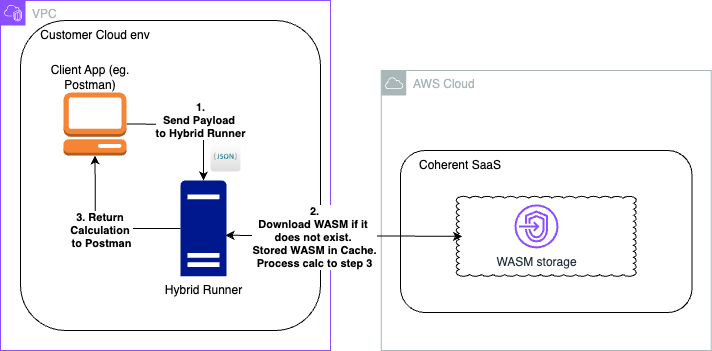
[`nodegen-server`](https://github.com/orgs/Coherent-Partners/packages/container/package/nodegen-server) will automatically retrieve the Wasm modules from Spark.

<figure><img src="https://2714190325-files.gitbook.io/~/files/v0/b/gitbook-x-prod.appspot.com/o/spaces%2Fc7fek1ZgAUH5MA3m5pH8%2Fuploads%2FOeEjc2AP5tEdK46WpsWp%2FPostman%20to%20Hybrid%20runner.png?alt=media&amp;token=a6c9600d-c799-4722-b53c-d7c9c2b68f5a" alt="Example of Client communicating via hybrid runner with automatic Wasm retrieval."><figcaption></figcaption></figure>

## Configure the container

Set the following environment variables for the container.

| Environment variable                        | Description                                                                                                                                                                                                                                                                                                                                                                                                                                                                                                                                                                                                                                                            |
| ------------------------------------------- | ---------------------------------------------------------------------------------------------------------------------------------------------------------------------------------------------------------------------------------------------------------------------------------------------------------------------------------------------------------------------------------------------------------------------------------------------------------------------------------------------------------------------------------------------------------------------------------------------------------------------------------------------------------------------- |
| `USE_SAAS`                                  | <p><code>false</code></p><p>This must always be set as <code>false</code>. The setting of <code>true</code> is for Coherent deployments on our SaaS environments. The default value is <code>true</code>.</p>                                                                                                                                                                                                                                                                                                                                                                                                                                                          |
| `SERVICE_ENDPOINTS__EXCELENGINE_SERVICEURL` | The base URL of your Spark SaaS account `https://excel.{environment}.coherent.global`.                                                                                                                                                                                                                                                                                                                                                                                                                                                                                                                                                                                 |
| `SAAS_SERVICE_AUTH_TYPE`                    | `syntheticKey` or `OAuth2`                                                                                                                                                                                                                                                                                                                                                                                                                                                                                                                                                                                                                                             |
| `SAAS_SERVICE_SYNTHETIC_KEY`                | <p>If <code>SAAS\_SERVICE\_AUTH\_TYPE</code> is <code>syntheticKey</code> then this value has to be configured.<br><br>API key created from <a data-mention href="/spark-apis/authorization-api-keys.md">/pages/PhwYdaswds2Px4st5cWt</a>. It must contain <a data-mention href="/identity-and-access-management/user-groups.md">/pages/ksfBi5P5EClp0OUieoWM</a> that are also assigned to <a data-mention href="/spark-apis/authorization-api-keys/permissions-features-permissions.md">/pages/9n1WLAaptjya2VdYAMUY</a> <code>Spark.GetNodegenZip.json</code><br>and <code>Spark.Resolver.json</code> or assigned to <code>Spark.AllEncompassingProxy.json</code>.</p> |
| `SAAS_SERVICE_OAUTH_ISSUER_BASE_URL`        | <p>If <code>SAAS\_SERVICE\_AUTH\_TYPE</code> is <code>OAuth2</code> then this value has to be configured.<br><code><https://keycloak.{environment}.coherent.global></code></p>                                                                                                                                                                                                                                                                                                                                                                                                                                                                                         |
| `SAAS_SERVICE_OAUTH_CLIENT_ID`              | <p>If <code>SAAS\_SERVICE\_AUTH\_TYPE</code> is <code>OAuth2</code> then this value has to be configured.<br>This can be set up with <a data-mention href="/identity-and-access-management/client-credentials.md">/pages/RP037PouT3w6NbkrkRtT</a>.</p>                                                                                                                                                                                                                                                                                                                                                                                                                 |
| `SAAS_SERVICE_OAUTH_CLIENT_SECRET`          | <p>If <code>SAAS\_SERVICE\_AUTH\_TYPE</code> is <code>OAuth2</code> then this value has to be configured.<br>This can be set up with <a data-mention href="/identity-and-access-management/client-credentials.md">/pages/RP037PouT3w6NbkrkRtT</a>.</p>                                                                                                                                                                                                                                                                                                                                                                                                                 |
| `CLEANUP_INTERVAL`                          | The interval in milliseconds before cleaning up any downloaded Wasm modules. The default value is `43200000` milliseconds (`12` hours).                                                                                                                                                                                                                                                                                                                                                                                                                                                                                                                                |

1. Ensure that the Docker engine/daemon is up and running.
2. [`docker image pull`](https://docs.docker.com/reference/cli/docker/image/pull/) the `nodegen-server` Docker image using the following command:

   ```bash
   docker pull ghcr.io/coherent-partners/nodegen-server
   ```
3. [`docker container run`](https://docs.docker.com/engine/reference/commandline/run/) the service and create a container called `wasm-server`.

   1. Define the parameters that will be used for authorization to the Spark servers. In this example we are using a `syntheticKey` for authorization.

   ```bash
   docker run --name wasm-server -p 3000:3000 -d -it \
     -e USE_SAAS=false \
     -e SAAS_SERVICE_AUTH_TYPE=syntheticKey \
     -e SERVICE_ENDPOINTS__EXCELENGINE_SERVICEURL=https://excel.myenvironment.coherent.global \
     -e SAAS_SERVICE_SYNTHETIC_KEY=22f68e51-b04b-4a46-b0aa-a629a8a3fca8 \
     -e CLEANUP_INTERVAL=43200000 \
     ghcr.io/coherent-partners/nodegen-server
   ```
4. Test the service using the `healthcheck` endpoint. You should receive the message `{"msg":"ok"}`.

   ```sh
   curl 'http://localhost:3000/healthcheck'
   ```
5. Execute a request similar to that in the [API Tester](/navigation/api-tester.md).

   * Note the change in the URI to `localhost:3000` and make sure to update `mytenant` in the URI to your tenant name.
   * See [Execute API (v3)](/spark-apis/execute-api/execute-api-v3.md) for more information on the [Execute API (v3)](/spark-apis/execute-api/execute-api-v3.md#request_data) and [Execute API (v3)](/spark-apis/execute-api/execute-api-v3.md#request_meta) structure and options.
     * Also see the [Hybrid runner API reference](/hybrid-runner/hybrid-runner-api-reference.md) for alternative endpoints available from the runner.

   ```sh
   curl --location --request POST 'http://localhost:3000/mytenant/api/v3/execute' \
   --header 'Content-Type: application/json' \
   --data '{
       "request_data": {
           "inputs": { "A": 1 , "B": 2 }
       },
       "request_meta": {
           "version_id": "c16d9b89-92c4-430f-a30e-9b04805fcb78",
           "call_purpose": "Online",
           "source_system": "Hybrid Runner"
       }
   }'
   ```
6. `nodegen-server` will first perform a lookup and verify whether the Spark service was already downloaded and cached locally.
   * If the service is not found locally, `nodegen-server` will use the provided Spark credentials to download the Wasm module from the SaaS platform and cache it until the `CLEANUP_INTERVAL` is reached.
   * If the service is found locally, `nodegen-server` will execute the Wasm module by loading it into memory, running the encapsulated logic, and returning the results back to the end-user.
7. It is good practice to [`docker container stop`](https://docs.docker.com/engine/reference/commandline/stop/) and [`docker container rm`](https://docs.docker.com/engine/reference/commandline/rm/) containers when you are finished.

   ```bash
   # stop the container
   docker stop wasm-server

   # remove the container
   docker rm wasm-server
   ```